9.2 Nonlinear constraints
Aside from contact, FEBio offers several types of nonlinear constraints that in some way constrain the solution of the finite element problem. In FEBio Studio, these constraints are differentiated based on whether they apply to surfaces or to volumetric bodies. Constraints that don't quite fit in either category are referred to as general constraints.
Similar to contact, these nonlinear constraints are enforced using an Augmented Lagrangian method.
Surface Constraints
A surface constraint constrains the solution of the finite element problem (e.g. displacement for a structural mechanics problem) at a surface. To add a surface constraint, go to the menu Physics → Add Surface Constraint, or right-click on the Constraints item in the model tree and select Add Surface Constraint.
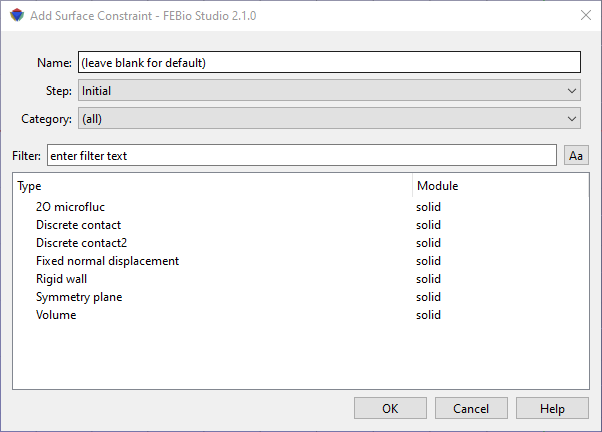
Figure 1. The Add Surface Constraint dialog box allows users to add nonlinear constraints on surfaces of the model.
For detailed descriptions of the surface constraints, please consult the FEBio User's Manual. You can press the Help button to take you directly to the relevant page in the FEBio User Manual in an separate web browser window.
Body Constraints
A body constraint constrains the solution of the finite element problem (e.g. displacement for a structural mechanics problem) on all the nodes of a volumetric body part. To add a body constraint, go to the menu Physics → Add Body Constraint, or right-click on the Constraints item in the model tree and select Add Body Constraint.
For detailed descriptions of the body constraints, please consult the FEBio User's Manual. You can press the Help button to take you directly to the relevant page in the FEBio User Manual in an separate web browser window.
General Constraints
A general constraint constrains the solution of the finite element problem in some special way. To add a general constraint, go to the menu Physics → Add Body Constraint, or right-click on the Constraints item in the model tree and select Add General Constraint.
For detailed descriptions of the general constraints, please consult the FEBio User's Manual. You can press the Help button to take you directly to the relevant page in the FEBio User Manual in an separate web browser window.